
Access Log
A live feed of door and device events — who accessed which door, when, and whether they were let through.
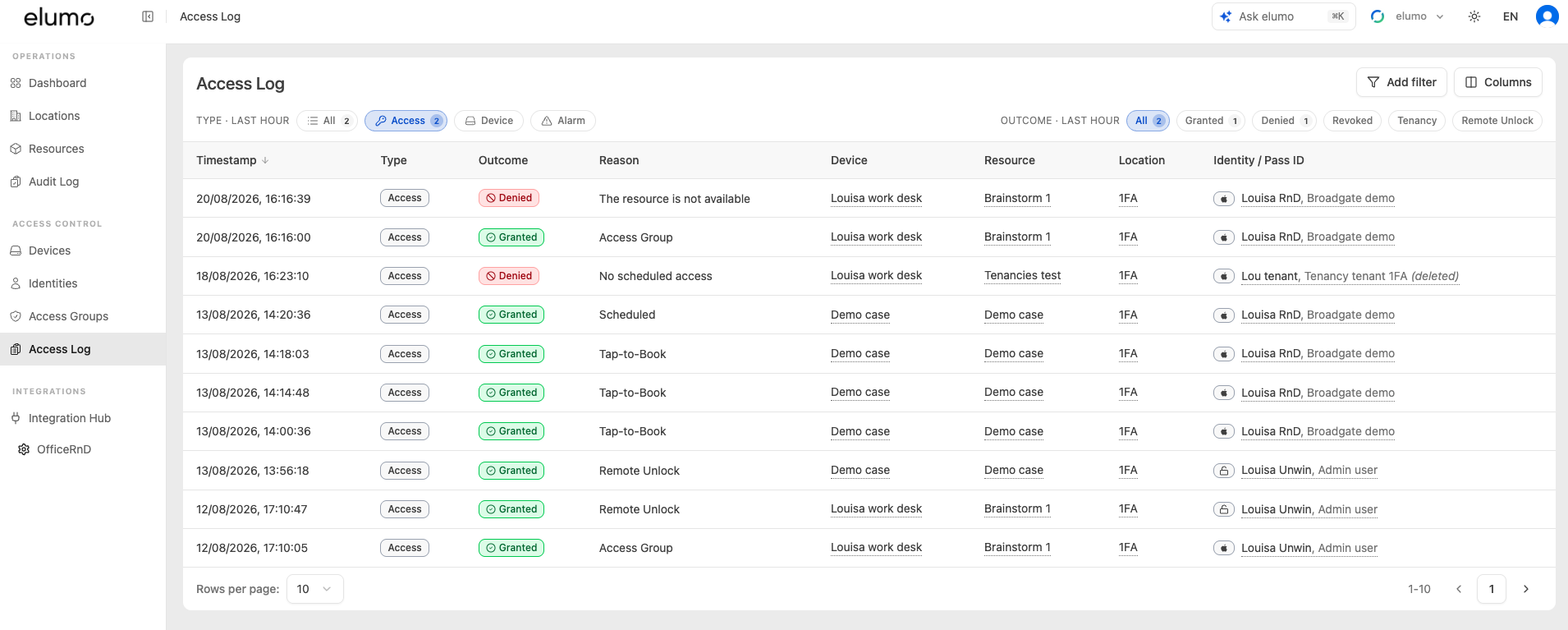
The Access Log is a live, newest-first feed of everything that happens at your devices — access attempts, device status changes and alarms. Use it to see who accessed which door, when, and whether they were let through.
Open it under Access Control, then Access Log.
What each row shows
Timestamp — when the event happened.
Type — Access, Device or Alarm.
Outcome — the result, such as Granted or Denied.
Reason — why, for example Access Group, Scheduled, Tap-to-Book, Remote Unlock, or No scheduled access. If denied, the reason will try to expand on why this may be.
Device, Resource and Location — where it happened.
Identity / Pass ID — who, with the pass or card used.
Filtering
Two rows of chips sit above the table:
Type — All, Access, Device or Alarm.
Outcome — All, Granted, Denied, Revoked, Tenancy or Remote Unlock.
You can also Add filter (for example by a specific device) and use Columns to choose which columns are shown.
Common uses
Check whether someone’s tap was Granted or Denied, and the reason why.
Confirm a Remote Unlock went through.
Spot a Door Forced or Door Held alarm.
See when a device went offline or came back online.
Related
To see who changed a setting in the portal (rather than who accessed a door), use the Audit Log instead.
Was this helpful?