
Audit Log
A record of every change made in the portal — what was created, updated or deleted, and who did it.
The Audit Log is a record of changes made across elumo — a trail of who created, updated or deleted what. Use it to see who changed a setting, and when.
Open it under Operations, then Audit Log.
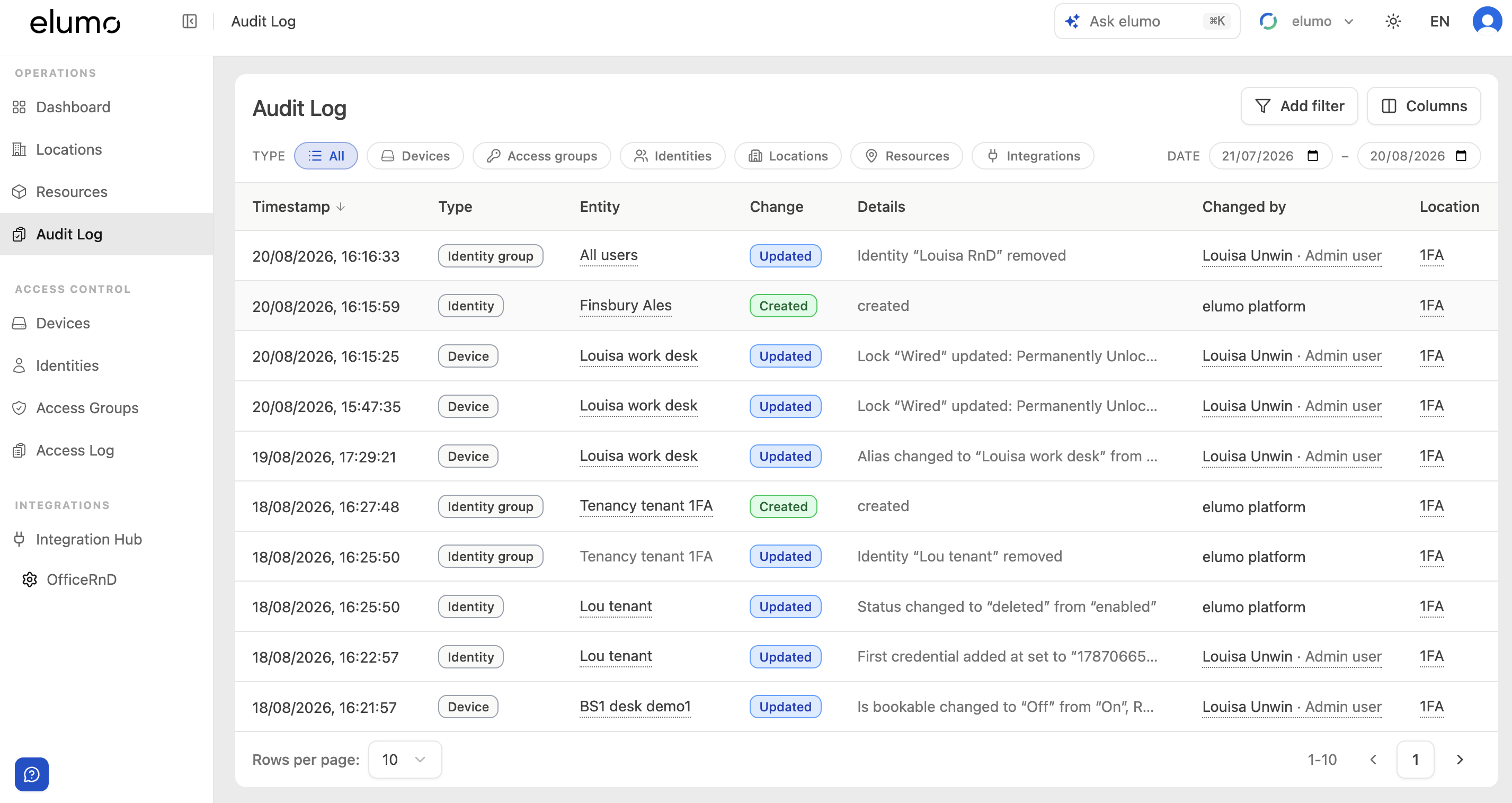
What each row shows
Timestamp — when the change was made.
Type — the kind of item changed: Device, Access group, Identity, Identity group, Location, Resource or Integration.
Entity — the specific item, such as a named identity or device.
Change — Created, Updated or Deleted.
Details — what changed, for example ‘Status changed to “deleted” from “enabled”’ or ‘Is bookable changed to “Off” from “On”’.
Changed by — who made the change: a named admin, or ‘elumo platform’ for system or integration changes.
Filtering
Filter by Type (Devices, Access groups, Identities, Locations, Resources, Integrations) and by a Date range. Add filter and Columns are also available.
Common uses
Find out who disabled an identity, and when.
See when a resource was made non-bookable, or a device’s settings changed.
Check when a change was made to an access group.
Related
To see door access events — who tried to open which door and whether they were let through — use the Access Log instead.
Was this helpful?