
elumo Reader Installation
Step-by-step instructions on how to install your elumo Reader
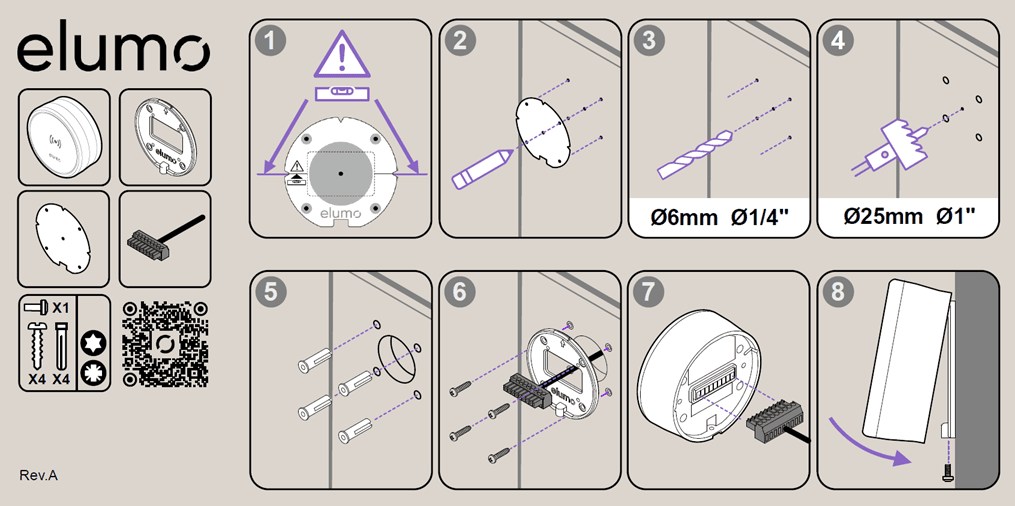
Use the mounting template provided to identify a suitable place on the wall to mount the reader, ensuring that you satisfy any regional accessibility requirements for its mounting height and that the template is upright & level.
Mark both the centre cable hole and the outer mounting locations using the holes provided
Drill the outer mounting holes using a 6mm or 1/4" diameter drill bit
Drill the centre cable hole using a 25mm or 1" hole saw or cut out as required
Place the supplied fixings in the outer holes
Mount the reader wall plate to the wall using the supplied screws ensuring that the elumo logo is upright and that the cable may pass through the centre hole
Attach the supplied reader cable to the back of the reader
Hook the reader on the wall plate from the top and secure underneath using the supplied security screw
Once the elumo Reader receives power from the elumo Hub you may then test your installation.
Was this helpful?